How We Compressed 90% of Our Storage With Zero Downtime
How compressing code coverage files help us keep prices the same when hardware prices keeps going up
The rising cost of hardware and storage, primarily due to the demand caused by AI, is hitting pretty much everyone in one way or another. For OtterWise, that means our hosting bills.
That, combined with our coverage ingress storage costs, means margins are becoming slimmer, giving us less headroom for growth. We are fully bootstrapped with no plans to ever accept any outside funding, so every cent truly counts.
This means we've had two options: raise prices, or look at our infrastructure bill and see what we can optimise. Price increases suck. While they can be necessary at times (inflation, currency fluctuations), we do not believe they are a must in every situation, so we decided to dig into our cloud bill and keep prices where they are.
File Storage and Egress
As of writing, we store around 2TB of XML, diff, log, JSON and CSV files. This is after stripping function names from ingress files such as diffs and XML.
Our storage is particularly high for two reasons:
- We don't rely on the GitHub API to pull diffs (we can't, and that is by design), so we must store the diff on upload.
- We offer very long data history.
Most of the files, around 1.5TB, are in cold or cold-adjacent storage, meaning the cost is minimal, as these files are old and rarely touched.
Still, this leaves close to 500GB of general storage with some degree of download. That adds up quickly.
Historically, we generated reports at runtime by pulling diffs and coverage files on demand.
In an average month, our file storage, retrieval and egress costs total many hundreds of dollars, and with our hosting bills increasing by 2-3x, it all adds up.
The Obvious Choice: Compression
JSON, XML and CSV files compress incredibly well, especially coverage files, which contain a lot of repetition. Our initial tests indicated a ~90% size reduction with gzip.
We decided to migrate all the files, starting with cold storage. This went slowly, but it was a low-risk first attempt because those files are rarely used. We completed a full compression of all cold files a couple of weeks ago with no system impact, saving around 1.3TB of data.
Next up came the real challenge: the active bucket. This bucket receives data almost every minute, 24/7, and data is retrieved from it at a similar rate. We cannot afford migration downtime.
Step 1: Preparing our code to handle gzipped files
First, we deployed a code change that looks for compressed files and falls back to the uncompressed versions if none was found. This had to happen before any migration could begin, otherwise reports would start to fail.
This meant a bunch of try/catch blocks, wrapped in a service which essentially did:
try {
    $diff = uncompress( $storage->get($commit->compressed_diff_filename) ) ;
} catch (FileNotFoundException|UncompressException $e) {
    $diff = $storage->get($commit->diff_filename);
}
Simplified example.
We also made sure all incoming files were compressed before storage. This prevented gaps once the migration started, so we did not have to keep chasing new uncompressed files.
Step 2: Migrating our own files
After local and staging tests, we could start migrating the remaining ~500GB.
OtterWise has a handful of different services, all of which run on OtterWise to track code coverage (who doesn't love a bit of dogfooding), so naturally we decided to test on our own codebases first, migrating only their files.
After around 15 minutes, we had migrated around 4GB and no errors were reported. We went into our reports, made sure everything rendered fine, and pushed a few commits to check the PR comments and status checks. All green. Promising.
Next, we did the same for a couple of partner companies that also use OtterWise. We migrated their files and let them run with it for 24 hours before proceeding. Nothing broke.
Step 3: Full migration pass
With no issues after 24 hours, we started the full migration.
We sorted by oldest file first. For each file, the migration made a compressed copy, confirmed that the copy could be uncompressed, and then deleted the original. This verification slowed things down drastically at scale.
We kept monitoring our caches, error reporting and read/write throughput. Apart from spikes in reads and writes, nothing was out of the ordinary.
After around 30 hours, the migration completed. We then did another pass to confirm that the code change from step 1 had not left any uncompressed files anywhere.
Step 4: Checking the result
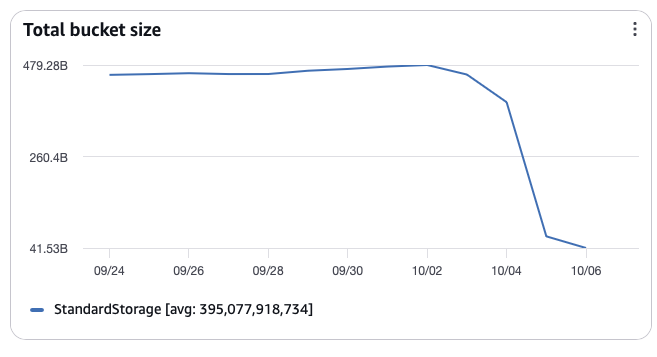
We were of course most excited to see the final result: a size reduction of around 90%. Including cold storage, we saved around 1.7TB, and over 400GB of that is in files we actively use.
Having tests in place for the different scenarios, such as "what happens if a compressed file exists but can't be uncompressed?", gave us the confidence to move faster, and test coverage tracking helped us ensure we had tests for all the changes.
Coming up: Relocating files entirely
At the time of writing, we use Hetzner for hosting and AWS S3 for file storage. This introduces two issues:
- Egress fees for files
- Latency on ingress and report generation
We had previously considered moving to Hetzner Object Storage with S3 as failover, but the storage cost (which we predicted would double in the coming year on our current trajectory, before compression) made this unviable.
Now, with our storage reduced by ~90%, we can pull this off. It has not been done yet, but we expect to complete it before the end of 2026. As with compression, we need to make sure all boxes are ticked before we do a live migration again.
